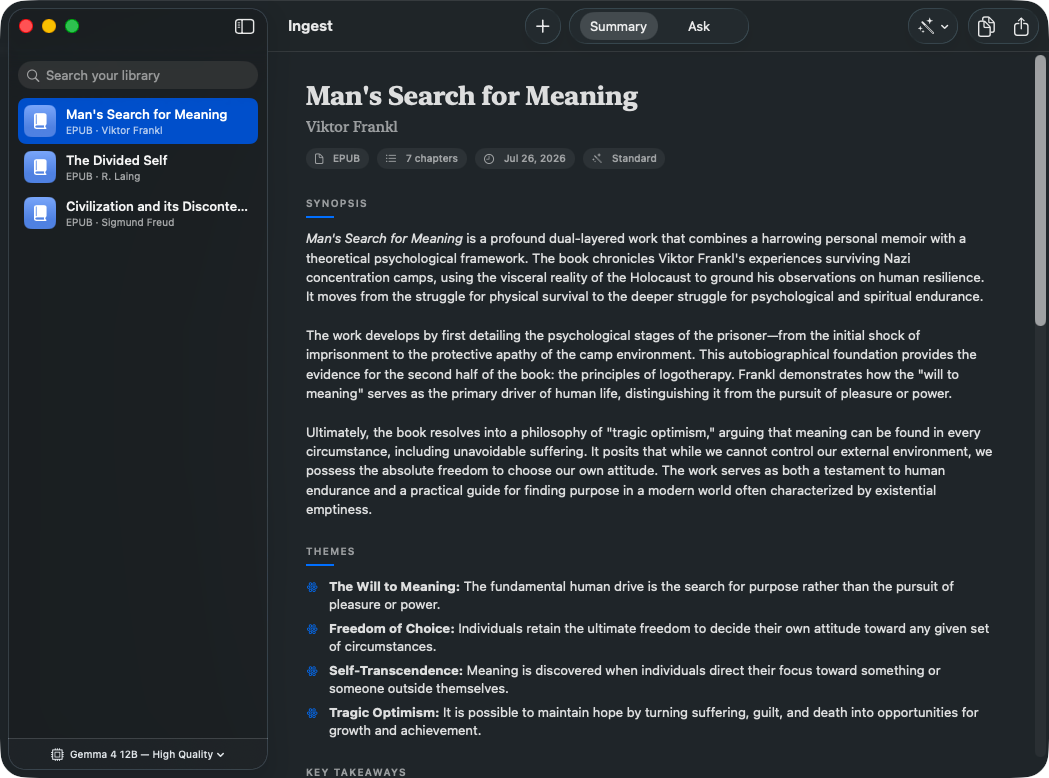
Ingest turns a PDF, EPUB or MOBI into a genuinely in-depth summary — chapter by chapter — then lets you ask it questions. Entirely on your Mac.
Version 0.2.0 · 17 MB · macOS 15 or later, Apple silicon
Every summary and every answer is produced by a language model running locally on your own hardware. Nothing you import is uploaded, and there is no account, no server, and no telemetry.
To be precise about the one exception: the first launch downloads the language model itself from Hugging Face. After that, Ingest works completely offline — your documents are never part of any network request.
Ingest reads a book in chapter-sized pieces, then builds a structured summary you can actually navigate.
A full synopsis, per-chapter breakdowns, recurring themes, key takeaways and notable quotes — each traceable to where it came from.
Ask anything and get an answer grounded in the actual text, with the chapters it drew from shown beneath — so you can check it rather than trust it.
One search across your whole library. Find which book discussed an idea, and jump straight to the chapter it appeared in.
A PDF with no text layer isn't a dead end. Ingest can recognise the text directly from the page images, on demand.
Brief, standard or in-depth — and switch after the fact. Ingest reuses the analysis it already did, so rewriting a summary takes seconds.
Copy any summary as Markdown or export it to a file. Everything is stored locally, in formats you can take elsewhere.
PDF, EPUB or MOBI. Ingest finds the chapter structure automatically, whether that comes from bookmarks, the spine, or the page layout itself.
The book is split along chapter boundaries and summarized in passes, then combined into one coherent whole. Progress is shown throughout, and interrupted runs resume where they stopped.
Switch to Ask and question the book directly. Short works are held in full; longer ones retrieve the passages that matter to what you asked.
Downloaded once, then reused. Bigger models write better summaries and need more memory.
| Model | Download | Memory | Best for |
|---|---|---|---|
| Gemma 4 E2B | 3.6 GB | 8 GB | Fastest summaries, smallest footprint |
| Gemma 4 E4B Recommended | 5.2 GB | 16 GB | The balance most Macs should start with |
| Gemma 4 12B | 6.8 GB | 24 GB | Noticeably deeper analysis |
| Gemma 4 26B | 15.4 GB | 32 GB | Near-flagship quality, moderate speed |
| Gemma 4 31B | 18.4 GB | 48 GB | The strongest, on high-memory Macs |